Ava arrived at School · 8:02 AM — and nobody had to text

Arrival alerts — the quiet “she’s arrived,” before you even ask.

Save the places where your family’s life happens — Home, School, Grandma’s — and everyone gets a gentle note when someone arrives or leaves. Tune which notes reach you, and when. Nothing to ask, nothing to check.

One plan, up to 10 people·Cancel in one tap

App Store·Google Play·or any browser
9:41
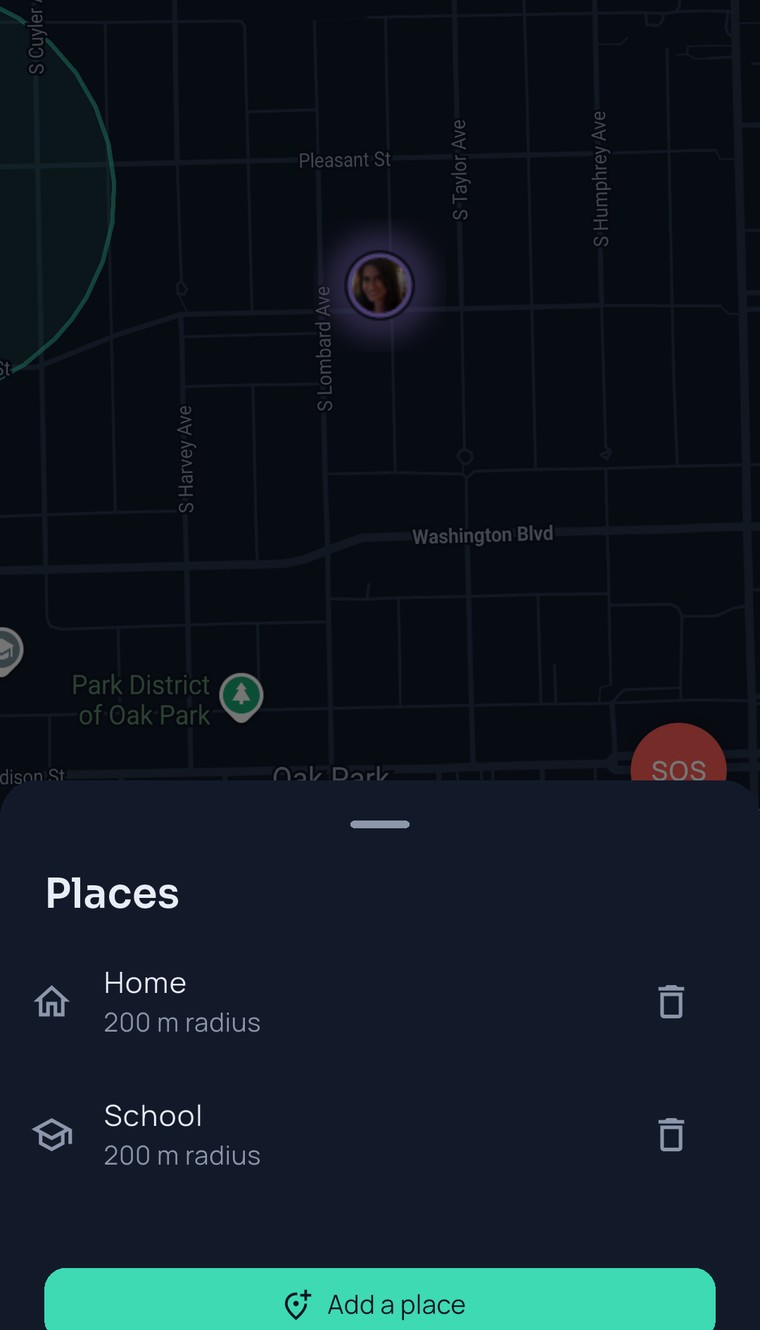
The FamilySeen map of Oak Park with the Places sheet open — Home and School saved, 200 m radius each, and the Add a place button
Monday, 7:48 AM

Three grown-ups, zero “did she get there?” texts.

First week Ava walks to school on her own. Mom’s at work, Dad’s on the train, Grandma is the designated worrier. Nobody wants to be the one who texts.

By Friday nobody’s asking “there yet?” Ava notices. That’s the point.

  1. Ava heads out. “Ava left Home” lands on three phones at once.Grandma reads it, nods, goes back to her tea.

  2. “Ava arrived at School.” Dad’s train is somewhere under the river; he sees it when he surfaces. Same note, same second, for everyone in the circle.Everyone except Ava. Her phone stays quiet — she knows where she is.

  3. “Ava left School.” Mom set School to arrivals only, so her phone doesn’t buzz in the meeting. Grandma gets both. She asked for both.Same feed for everyone. What buzzes is up to each person.

How it works

Save a place. That’s the setup.

Anyone in the circle can add one, and the whole circle gets it. Drag the map, name it, pick how big — done.

Drop it on the map

Drag the map until the crosshair sits on the front door, name it “Home,” pick an icon. Anyone in the circle can add a place — it’s shared with everyone.

Pick how big

A radius from 100 to 500 meters — 200 by default — drawn as a circle right on the map, so School covers the school, not the whole neighbourhood.

Then it just happens

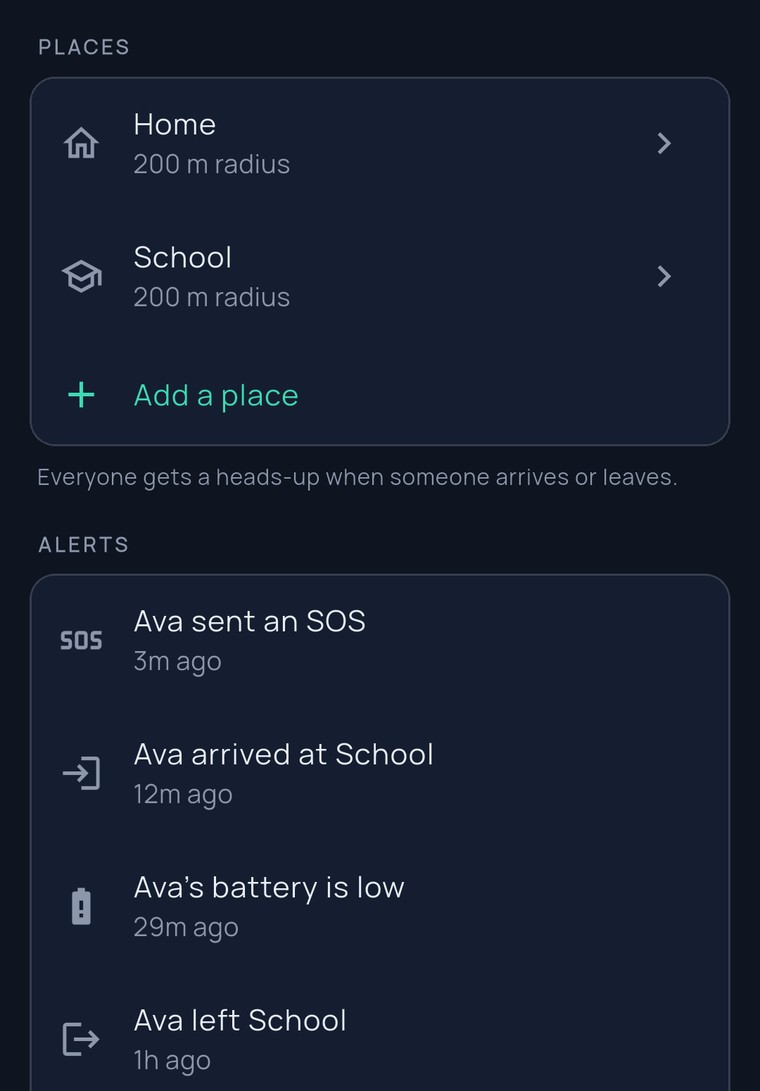
Ava’s phone crosses the line and “Ava arrived at School” lands on everyone else’s phone — hers stays quiet. The same note shows in the Alerts feed for the whole circle.

9:41
The FamilySeen Safety tab — Places with Home and School saved, and the Alerts feed: Ava arrived at School, Ava’s battery is low, Ava left School
What’s different about these alerts

Gentle by default. Yours to tune.

Everyone sees, only some buzz

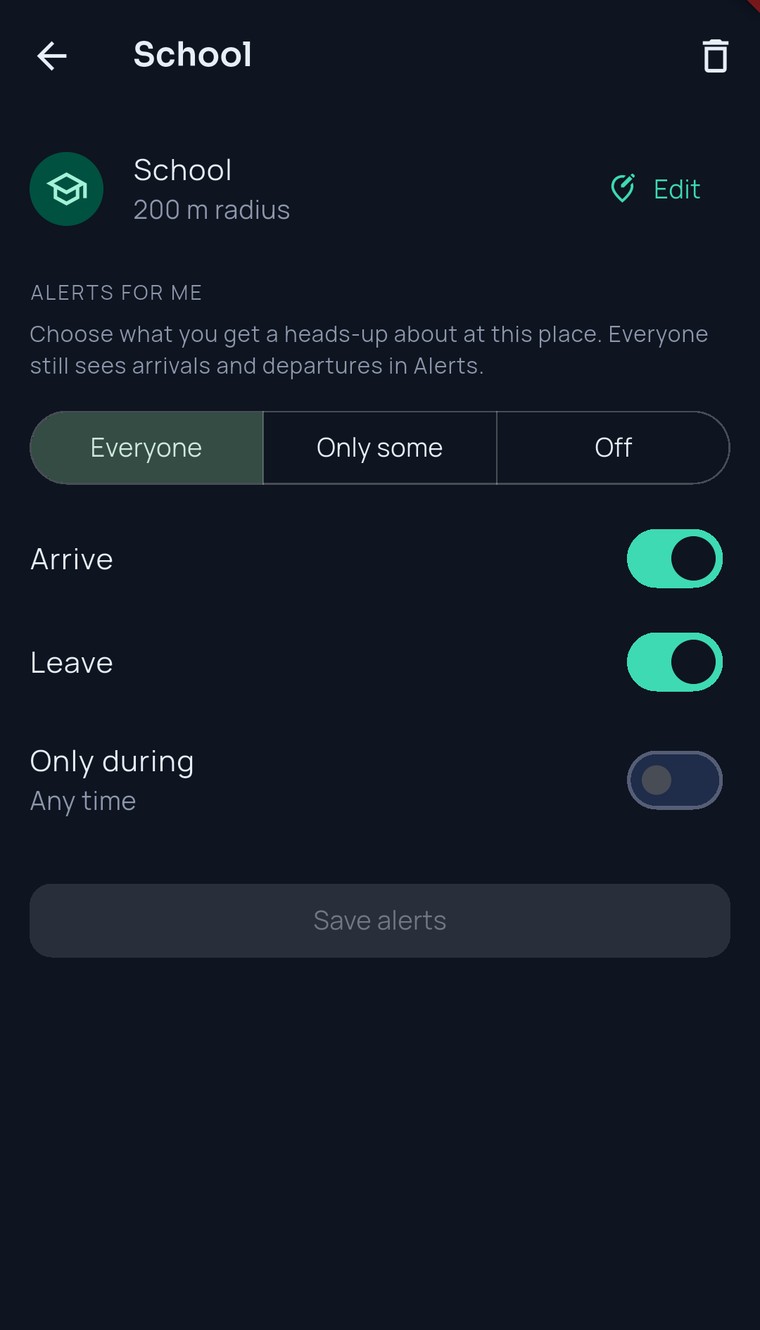
The Alerts feed is the same for the whole circle. What buzzes your own phone is your own choice, per place: everyone, only some people, or off.

Only during the hours you pick

Set School to weekdays, 7 to 5, and it stays silent on Saturday. Arrivals only, departures only, or both — the note you want, not the noise.

Real places, the right size

Each place is a circle you can see on the map — a radius of 100 to 500 meters. The list reads “At Home” or “1.2 km from School” — Grandma understands it the first time.

No guessing on shaky GPS

If a phone’s fix is fuzzier than the place’s radius, we skip that point instead of guessing. Every other point counts — so give School a radius that comfortably covers the gates.

9:41
The FamilySeen School place screen — 200 m radius, and “Alerts for me”: Everyone / Only some / Off, Arrive and Leave switches, Only during
Free: 2 places per circleHome and School — the two that matter most. Everyone in the circle gets the notes.
Premium: up to 20 placesWork, practice, both grandparents, the sitter. $9.99/mo or $79.99/yr — one person pays.
Alerts for me: your callPer place, per person: everyone, only some, or off — and only during the hours you pick.
In the background, on the appsThe apps keep sharing in the background. In a browser, you’re on the map while the tab is open.
Questions, answered straight

Arrival alerts — what parents ask

Is this a geofencing app?
Under the hood, yes: a saved place is what a geofence app calls a fence — a circle on the map with a 100 to 500 meter radius — and crossing it writes “arrived” or “left.” We just don’t talk like that at the dinner table. You save Home, School and Grandma’s; the family location app turns them into arrival alerts the whole circle can trust.
Do alerts work while the phone’s in a pocket?
Yes. The apps keep sharing in the background, with a notification on the sharer’s phone that always shows. On the web you’re on the map while the tab is open.
Will my teenager get buzzed every time I get home?
Only if she wants to be. Each person picks, per place, whose arrivals they get a heads-up about — everyone, only some, or nobody — and during which hours. The shared Alerts feed still shows every arrival for the whole circle; her phone just doesn’t buzz.
What if the GPS wobbles?
We skip any fix whose error is bigger than the place’s radius, instead of guessing. Every other point counts — so give a place a radius that comfortably covers it. 200 meters is the default for a reason.
Around your places
FamilySeen

Everyone home safe. Starting tonight.

7-day money-back guarantee · Cancel anytime · SOS free forever

Start on any device — everything stays in sync